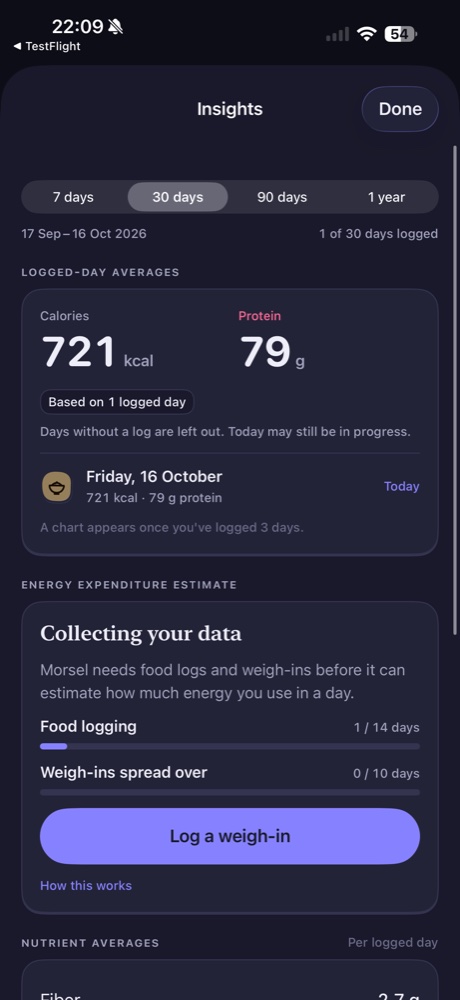
An average is more useful when you know which days are included. In Morsel Pro, Insights explicitly shows logging coverage and describes its figures as logged-day averages. That gives the numbers context before you use them to compare one period with another.
Start with the date range and coverage
Choose the period you want to inspect: 7 days, 30 days, 90 days or 1 year. Read the exact dates underneath the selector, then check how many days contain logs. A 30-day range with one logged day is a view of that day’s entries, not evidence of a month-long pattern.
The current screen shows 1 of 30 days logged. It also shows 721 kcal and 79 g protein as averages based on that one day. Those are example screen values, not suggested intake levels or proof that a complete day has been recorded.
Notice what is left out
Morsel states that days without a log are excluded. That is different from treating every missing day as zero food. It is also different from knowing what happened on those days: the app does not recover unrecorded meals simply by showing an average.
Today can still be in progress. Before comparing two periods, consider whether one contains incomplete days or only a few entries. Differences in coverage can change the interpretation even when the displayed numbers look precise.
Wait for enough information to show trends
The current Insights screen says a chart appears after three logged days. Until then, it shows the available day record. That early state is informative because it reveals the underlying data instead of drawing a trend from one observation.
When a chart becomes available, keep the coverage context in mind. More observations can provide more to inspect, but they do not automatically resolve missing meals or incorrect portions.
Separate readiness from an energy result
The energy expenditure section initially says Collecting your data. It shows progress toward food logging and weigh-in requirements, with a Log a weigh-in action. The supplied screen uses 14 food-logging days and weigh-ins spread over 10 days as its readiness indicators.
Those indicators describe the app’s current requirements; they do not establish that an estimate is already available. Review the explanation in the app and treat the eventual result as an estimate. Insights is included in Pro at $3 USD per month.
Continue with reading your daily totals and correcting portions.