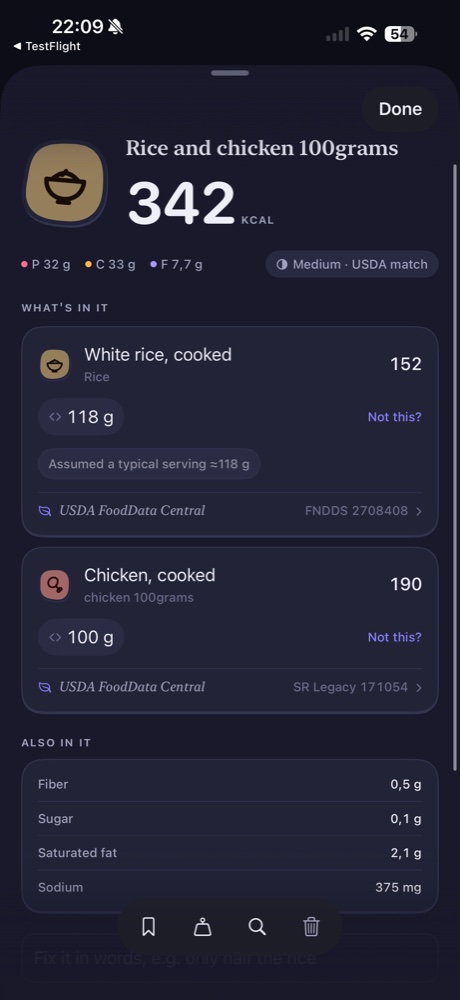
The first thing to check in an unexpected food estimate is often the portion. The right food at the wrong weight can still produce an unhelpful entry. In Morsel, open the food details and compare the assigned quantity with what you actually ate before changing anything else.
Separate the food from the amount
Check the matched name first. “White rice, cooked” is a specific description, not simply a synonym for every kind of rice. Then check its weight. If the app has assumed a typical serving, the screen calls that out; it is an estimate to review, not a measurement of your plate.
In the supplied composite entry, rice is assigned an assumed 118 g serving and chicken is assigned 100 g. The phrase “rice and chicken 100grams” does not establish that both ingredients together weigh 100 g. Writing each quantity explicitly helps avoid that ambiguity.
Match the preparation to the measurement
If you weighed a food after cooking, look for a cooked-food match. If you recorded its dry weight before cooking, make that clear instead. USDA FoodData Central descriptions distinguish characteristics such as raw and cooked, and portion information is specific to food records and data types.
Do not assume that one cup always means the same number of grams. A cup describes volume; the corresponding weight depends on the food and how it is represented. Use a measured weight when you have one, and treat household measures as descriptions that still need checking.
Review packaged portions separately
For packaged food, compare the serving size and the number of servings with the amount you ate. FDA guidance explains that nutrition information is usually given per serving, although some packages also display per-container information. Half a package and half a serving are not necessarily the same amount.
A barcode match or label photo can help identify the product, but neither removes the need to check the quantity. A correct product at an entire-package portion may be wrong for a few bites.
Make one clear correction
Adjust the affected portion, then inspect the updated entry. For mixed meals, repeat this check for each component. Keep the original preparation detail in mind when you make the change; correcting grams while leaving the wrong food selected does not resolve the whole mismatch.
Sources: USDA food description documentation and FDA serving-size guidance.
Next: mixed-dish estimates and barcode logging.