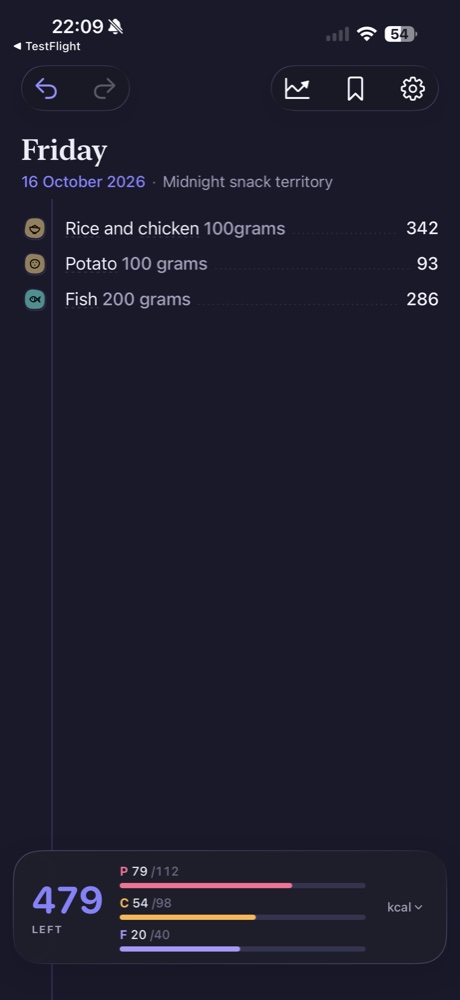
Typing a meal can be as straightforward as writing a note: a food name, a useful portion and any preparation detail that changes what you mean. Morsel turns that description into matched foods and nutrition estimates. You still get to inspect the result rather than treating the first number as the final answer.
Start with a description you can check
Write the foods you actually ate. “Chicken” gives less context than “cooked chicken, 100 g.” If you know the rice was cooked when you weighed it, include that too. A familiar dish name is a starting point, but individual ingredients and amounts can make your intention clearer.
For a simple illustrative entry, try “cooked rice, 150 g” or “Greek yogurt, 170 g.” These examples describe input style; they are not fixed nutrition values or a guarantee of a particular match. You can log by typing in any language in both Morsel Free and Pro.
Inspect what the app understood
Once nutrition values appear, tap a value to open the entry’s details. Look at the matched food name, preparation and weight. A composite entry can contain several matched ingredients, so review each component rather than checking only the headline calorie number.
The current rice-and-chicken example demonstrates why this matters. The app assigns a typical rice portion when its amount is not explicit. The match may be reasonable while the portion is different from what was on your plate.
Correct the uncertain part
If the food is wrong, use the match correction. If the quantity is wrong, adjust the portion. The detail sheet also provides a field for describing a correction in words. A useful correction identifies the food and the change, rather than saying only “that is wrong.”
You do not need to rewrite a whole meal because one ingredient needs attention. Review the component that changed, then check the resulting entry and daily total.
Keep the next entry easy
For recurring foods, reuse clear descriptions. For recurring combinations, consider saved meals. Free includes up to 15 saved meals, while Pro extends saved-meal access and adds other tools. The best entry is one you can understand again when you revisit your journal.
For more on the next step, read how to check portions and how saved meals differ from recipes.