A food journal can show several kinds of numbers at once: the food’s quantity, its calorie estimate and its protein, carbohydrate and fat values. Before interpreting a number, check which of those measurements is currently on screen. A value in grams can describe either a portion or a nutrient, and the distinction changes what it means.
Start with the selected metric
Morsel’s journal includes a metric selector in the bottom summary. When calories are selected, the numbers next to foods represent calories. When another metric is selected, the displayed values need to be read in that context. Open a food entry if you want the full breakdown instead of switching repeatedly between metrics.
Inside the detail sheet, P, C and F stand for protein, carbohydrates and fat. The portion weight is shown separately for each matched food. A 100 g portion of chicken does not mean the entry contains 100 g of protein.
Read a daily total against its target
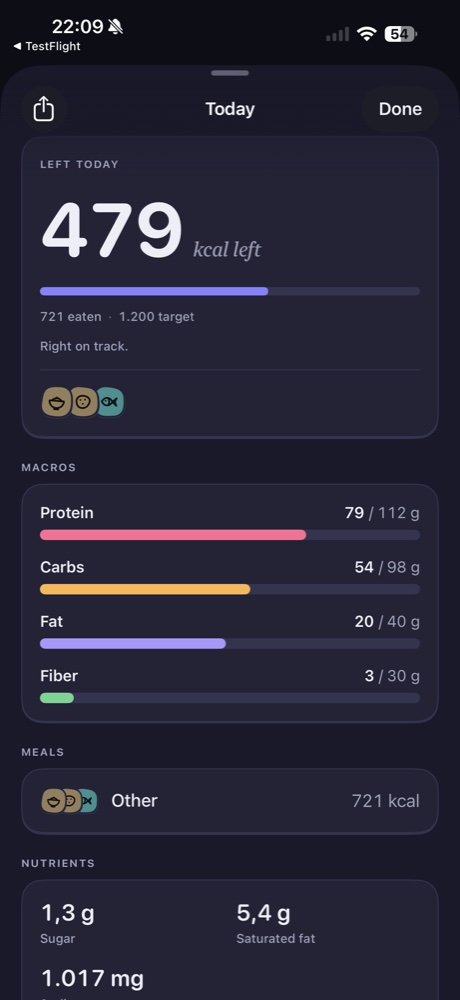
The daily summary shows consumed calories and the daily target, along with a remaining value. For example, the supplied screen shows 721 eaten, a target of 1,200 and 479 remaining. That is an explanation of the interface, not a suggested calorie target for you.
The macro bars use the same consumed-versus-target idea. Read both numbers and the unit rather than judging the bar by its color alone. A shorter bar says how the logged amount compares with the displayed target; it does not independently evaluate a meal.
Check the underlying entries
If a daily total looks surprising, review the foods that make it up. A duplicated meal, an assumed portion or a raw-versus-cooked mismatch can matter more than how the summary is presented. Correcting an entry is more useful than trying to make the total look familiar.
Targets and food estimates answer different questions. The target is the reference used by the app; the entries are the nutrition recorded so far. Neither means the journal is complete, especially while the day is still in progress.
Use the right view for the question
Use the journal to see individual entries, the daily summary to review one day and Insights Pro to look at logged-day averages over a period. Avoid comparing an unfinished day directly with a completed day without noticing the difference in coverage.
Continue with portion checks or understanding Insights.