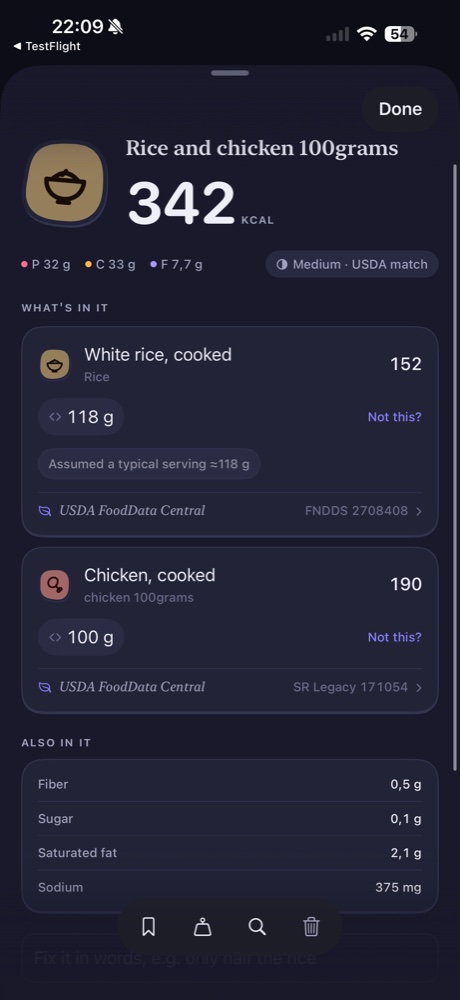
A photo can be a useful starting point when writing out a meal feels awkward. Morsel Pro supports photos of meals and food labels, turning them into journal entries. It is still worth reviewing the result: an image is an input to an estimate, not a direct measurement of every ingredient on the plate.
Choose the image that answers your question
A meal photo shows the dish you ate. A food-label photo shows information printed on a product. If your question is about a packaged item’s listed nutrition, a readable label offers different information from a photograph of the food alone.
Photograph the relevant food or label clearly. For a label, keep the serving information and nutrition panel legible. For a meal, make the components visible rather than covering most of the plate. These are practical input tips, not a promise that the app can resolve everything from one image.
Review the names before the totals
Inspect the foods assigned to the entry. Check whether the app interpreted the dish as the right preparation and whether multiple components were identified sensibly. A plausible-looking calorie total is not enough to establish that every ingredient was represented.
For foods that are not visually obvious, add context through a correction. A sauce, added oil or ingredient inside a dish may need an explanation. Keep the correction specific enough to identify what was missing or misunderstood.
Check portions independently
A food photo does not tell you the measured weight you would get from a kitchen scale. If you know the amount, use it to check the portion in the entry. On a packaged product, compare the recorded serving with the amount eaten, not simply with the fact that a label was recognized.
You can review a food’s details and correct a match or portion. After a correction, inspect the new values and make sure the original entry was updated as intended.
Decide whether Pro fits your routine
Photo logging is part of Pro at $3 USD per month. Typed logging and barcode scanning are in Free, so you can choose those methods when a photo would add little useful information. Pro also includes Insights and other features described in the plan comparison.
Start with portion checks if the food looks right but the amount does not. For a whole dish with several components, continue to mixed meals.